
dell laptop power button repair in patna
Dell Laptop Power Button Not Working – Causes, Fixes, and Repair Guide
A laptop power button not working can be a frustrating problem, especially when you urgently need to use your device. Many Dell laptop users experience this issue due to hardware faults, dust buildup, or internal connection problems. If your laptop refuses to turn on when you press the power button, it’s important to understand the possible causes and solutions. In some cases, professional help such as dell laptop power button repair in patna may be required to fix the issue properly.
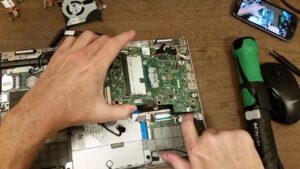
Why Is My Dell Laptop Power Button Not Working?
There can be several reasons why your Dell laptop power button is not responding. Understanding the cause can help you decide the best solution.
1. Dust or Dirt Around the Button
Over time, dust can accumulate around the power button. This can make the button stiff or prevent it from making proper contact.
2. Damaged Power Button Cable
Inside the laptop, a small cable connects the power button to the motherboard. If this cable becomes loose or damaged, the laptop may not turn on.
3. Motherboard Problems
Sometimes the issue is related to the motherboard. If there is a fault in the motherboard, the power button may not respond even when pressed.
4. Battery or Charger Issues
In some cases, the problem is not with the power button but with the battery or charger. If the laptop is not receiving power, it will not start.
If the issue seems serious, getting dell laptop power button repair in patna from a professional technician can be a reliable solution.
Simple Solutions to Fix Dell Laptop Power Button Issues
Before visiting a repair center, you can try some basic troubleshooting steps.
1. Perform a Power Reset
A power reset can sometimes solve startup problems.
Steps:
-
Turn off the laptop completely.
-
Remove the charger and battery (if removable).
-
Press and hold the power button for 20–30 seconds.
-
Reconnect the charger and try turning on the laptop.
2. Check the Charger
Make sure your charger is working properly. A faulty charger can prevent the laptop from turning on.
3. Clean the Power Button
If the button feels stuck, gently clean around it using a soft brush or compressed air.
4. Try External Power Options
Some Dell laptops allow you to power on the device using an external keyboard through BIOS settings.
If none of these solutions work, it may be time to consider dell laptop power button repair in patna to diagnose the problem professionally.
When Should You Seek Professional Repair?
You should consider professional repair if you notice the following symptoms:
-
The laptop shows no light or response when pressing the power button
-
The power button feels physically damaged
-
The laptop turns on only occasionally
-
You hear internal sounds but the laptop does not start
In these situations, getting dell laptop power button repair in patna from experienced technicians can help ensure the problem is fixed safely.
Cost of Dell Laptop Power Button Repair
The repair cost depends on the actual problem inside the laptop.
Estimated cost range:
-
Power button replacement: ₹500 – ₹1500
-
Power button cable repair: ₹800 – ₹2000
-
Motherboard repair: ₹2000 – ₹6000+
For accurate diagnosis and quick service, many users prefer dell laptop power button repair in patna from professional laptop repair specialists.
Tips to Prevent Power Button Damage
To avoid this issue in the future, follow these simple tips:
-
Press the power button gently
-
Keep your laptop clean and dust-free
-
Avoid using the laptop in dusty environments
-
Use the original charger
-
Ensure proper ventilation to prevent overheating
If the problem still occurs, professional services like dell laptop power button repair in patna can help restore your laptop quickly.
FAQ – Dell Laptop Power Button Repair
1. Why is my Dell laptop not turning on when I press the power button?
This could happen due to battery issues, charger faults, internal cable damage, or a faulty motherboard.
2. Can a Dell laptop power button be repaired?
Yes, in most cases the power button can either be repaired or replaced by a technician.
3. How long does power button repair take?
Typically, it takes around 30 minutes to 2 hours depending on the issue.
4. Is it safe to replace the power button?
Yes, if it is done by a skilled technician using proper tools.
5. Where can I get Dell laptop power button repair in Patna?
You can visit a professional laptop repair center that offers dell laptop power button repair in patna to get the issue fixed quickly and safely.
If your Dell laptop power button is not working, don’t panic. Try the basic troubleshooting methods mentioned above. If the issue continues, professional repair services can help bring your laptop back to working condition.